
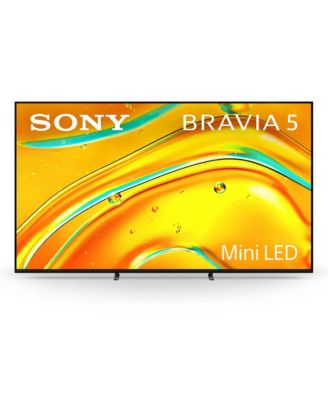
SONYK65XR50 BRAVIA 5 65" Mini LED 4K HDR Google TV
SONYK65XR50 BRAVIA 5 65" Mini LED 4K HDR Google TV
Product Details
- WHAT IT IS:
Sony LED and LCD TVs
WHAT IT DOES:
Cinema Is Coming Home Feel the emotion and excitement of the movies with BRAVIA. Sony's decades of professional filmmaking experience allow us to faithfully recreate the creators vision at home with cinematic brightness contrast and color. Immerse yourself in the story with detailed picture quality just as you see in real life. Features Thousands of Precisely Controlled Mini LEDs Billions of Accurate Real-World Colors XR Processor with AI Technology Blur-Free XR Motion Clarity Technology Billions Of Real-World Colors Access billions of accurate colors and shades capturing every subtlety seen in real life. XR Triluminos Pro enhances the range of hues and saturation revealing extremely precise color in every scene. Features
- Sony: K65XR50, standard manufacturer accessories, and manufacturer issued manual
- Dimensions - 56.96" L x 2.28" W x 32.75" H
- Model Number - K65XR50
- Functionality - LED and LCD TVs
- Compatibility may vary depending on your specific connecting device, system configuration, and supported formats
- Weight - 75
- 1 year limited warranty
- Plastic
- Imported
Shipping & Returns
- Our Normal Gift Boxing is not available for this item.
- This item may not be shipped to Hawaii, California, Marshall Islands, Guam, Alaska, Northern Mariana, U.S. Virgin Islands, Palau, Puerto Rico, Federated States of Micronesia, American Samoa
- This item may not be shipped to California.
- This item may not be shipped to P.O. boxes or Alaska, American Samoa, Guam, Hawaii, Marshall Islands, U.S. Virgin Islands, Puerto Rico, Palau, or the Pacific Islands.
- California and Minnesota customers call 1-800-777-0000 for free shipping information.
- Please note all returns must be sent directly to the third-party seller. Most refunds are processed within 5-10 business days.
- All refunds are up to the discretion of the seller. Merchandise must be returned with all original vendor tags intact and must be in saleable condition.
- Web ID: 5657155
19 reviewssorted by Newest
So Far So Good, Kinda
The TV seems to be fine, BUT THE REMOTE DID NOT WORK RIGHT OUT OF THE BOX. For EVERY Click to progress thru set-up/passwords I had to remove the batteries and click, remove batteries and click………. After 1,000 clicks I kinda go it to a point of working
Customer review from sony.com
Response from sony.com
Hi RandyW, We are sorry for the trouble you experienced with the remote during setup, though we are glad to hear it is now working. We recommend checking for a TV firmware update to ensure the Bluetooth connection remains stable and prevents this from happening again. If the remote begins to act up or lag in the future, please contact one of our technicians so we can help you further: https://us.esupport.sony.com/support/s/support-contact?language=en_US Thanks for choosing Sony. Best regards, Eliab
Great TV
Bought this 3 weeks ago and TV looks great, we use it to watch Movies, Football and regular Television and the picture looks wonderful. Set up is a pain but got through it and love it
Customer review from sony.com
Response from sony.com
Hi CRSU, It brings us great satisfaction to hear that your BRAVIA 5 is providing such a wonderful picture for your movies, football, and daily viewing. While we understand the setup took a bit of effort, we are delighted that you are now loving the results of your new TV. We really appreciate you being part of the Sony family. Regards, Dominick
Awesome!!!
Received as a gift!! And love the quality of the picture
Recommends this product
Customer review from sony.com
Response from sony.com
Thank You for the Fantastic Review, Willow1003! We are absolutely thrilled to hear that your new K-65XR50C television was a gift and that you are enjoying it so much! It is incredibly rewarding to know that the quality of the picture is making such a positive impression. We put a tremendous amount of effort into delivering the clear, vibrant, and stunning images you expect from a premium Sony TV, and we are delighted that it shines through in your viewing experience. Thank you again for sharing your feedback and for making Sony a part of your home! Best regards, Gus, Sony Social Media Team
AMAZING TELEVISION......PATHETIC REMOTE CONTROL
This tv is unbelievable. Everything about it is perfect....with the exception of the worthless, TINY remote control. This is a $6500 Sony 98'' television. This remote is simply unacceptable. I immediately ordered a new universal Sony remote with backlit buttons and a numeric keypad and play/pause/rewind/fast forward options.
Recommends this product
Customer review from sony.com
Response from sony.com
Hi NautilusPIMP, We are elated to hear that you find your 98-inch Sony BRAVIA 5 "unbelievable" and that everything about the TV itself is perfect, leading to a five-star rating! We are thrilled that the TV's performance and quality are truly outstanding. However, we sincerely apologize that the included remote control was disappointing. We appreciate you sharing your detailed and honest feedback about the size, lack of backlighting, and missing dedicated keys. We have noted your comments and will certainly be sharing your concerns about the included remote with our Product Development Team for their review and consideration in future accessory designs. Thank you for choosing Sony! Regards, Dominick
The picture quality is outstanding
We were honestly blown away by how beautiful the pictures looked! The colors were so vivid and lifelike, and the blacks were perfectly deep and not that dark gray you usually see on other TVs. It felt like we were watching scenes unfold in real life. The moment the TV turned on, all we could say was, “Wahh! This is beyond imagination!” Definitely one of the best purchases we’ve made recently and every penny was totally worth it.
Recommends this product
Customer review from sony.com
Response from sony.com
Thank you for sharing your fantastic review, Kookie09017! We are absolutely delighted to hear that you were "blown away" by the picture quality of your K-65XR50 television! It’s incredibly rewarding to know that the visual experience led you to say, “Wahh! This is beyond imagination!” We specifically engineer our screens to deliver colors that are vivid and lifelike and to achieve perfectly deep blacks, avoiding the grayish look of other panels. Your feedback is a wonderful validation of our commitment to delivering a truly immersive, realistic viewing experience. Thank you again for choosing Sony and for confirming that this purchase was "totally worth every penny." Best regards, Gus, Sony North America Customer Support
Good TV but only lapse is can't connect Hard Drive
It's a good TV with good technology but the only thing is that I cannot connect my external hard drive with this TV as I have seen that because of some power output this TV doesn't supports external hard disk.
Recommends this product
Customer review from sony.com
Response from sony.com
Hi Vaibs67, It's great to hear that you find the Sony BRAVIA 5 to be an excellent TV with good technology, and we sincerely appreciate you taking the time to leave a 4-star review! We also want to address your concern regarding the external hard drive immediately. We apologize for any confusion, but we are happy to confirm that the BRAVIA 5 absolutely supports external hard drives for media playback! It sounds like the issue you encountered may be related to the drive's formatting or its power draw exceeding the USB port's output. For future reference, the BRAVIA 5 officially supports external hard drives that use the following specifications: Supported File Systems: FAT32, exFAT, and NTFS Maximum Drive Size: FAT32: Up to 2TB exFAT and NTFS: Up to 32TB If your current external hard drive is formatted outside of these systems or exceeds the size limits, that would explain the connection issue. For a full breakdown of compatible hard drive requirements and additional troubleshooting steps, you can visit: https://www.sony.com/electronics/support/articles/00148248 We hope this clarifies the situation and helps you get your hard drive connected so you can enjoy all your media! Thanks for choosing Sony! Regards, Dominick
Well, if only it worked
Took an hour or so to have it set up on TV stand. Plugged it in and it powered up. Only problem was the remote and the TV didn't recognize each other so all I had was a $1000 nothing in the room. Called the retailer PC Ricardsxand was transferred four times before getting to speak with someone. No service available today or tomorrow. I asked him to overnight a new remote and he said he'd get back to me. Four hours later I'm still waiting. My suggestion, don't purchase from PC Richard's.
Customer review from sony.com
Response from sony.com
Hello Mr Rob, Thank you for considering Sony products. We sincerely apologize for the frustrating experience you’ve had with setting up your K-55XR50 TV and the issues with the remote and TV recognition. We also apologize for the inconvenience you experienced with the dealer and the delays in getting the support and replacement remote you needed. This is certainly not up to the quality standards we strive for. We appreciate you taking the time to share your feedback. Please rest assured that we will forward your comments to our dedicated Sony team for their review as we continue to work diligently to improve our products and service. Best regards, -Fred
Apps Crashes Constantly
All the main apps like Netflix or YouTube crashes constantly and there is no update that fix them. The remote control has buttons for apps that never works.
Customer review from sony.com
Response from sony.com
Hi IsmaelChicago, We are sorry to hear that you are experiencing performance issues with the apps and remote functionality on your BRAVIA 5. This is certainly not the experience we want you to have. To resolve these crashes and connectivity glitches, please try the following troubleshooting steps: 1- Perform a Power Cycle: Unplug the TV power cord from the wall outlet for approximately 2 minutes. Plug it back in and turn the TV on. This performs a soft reset that clears out temporary glitches and refreshes the system memory. 2- Check for System Updates: Ensuring your TV has the latest firmware is vital for app stability. Navigate to: Settings > System > About > System Software Update > Update your TV software. 3- Clear App Data and Cache: If specific apps like Netflix or YouTube are crashing, clearing their stored data can fix the issue: Go to Settings > Apps > [Select the specific app] > Clear data and Clear cache. If these steps do not resolve the issue, we want to help you get your TV back to peak performance. Please contact our dedicated technical support team for further troubleshooting at: https://us.esupport.sony.com/support/s/support-contact?language=en_US&category=tv Thank you for considering Sony! Regards, Dominick